
FMKFilter: Ultimate Content Filtering Extension for FMKorea
ys27
Cara Install Ekstensi Chrome
- Klik tombol "Add to Chrome" di atas.
- Anda akan diarahkan ke Chrome Web Store.
- Klik "Add to Chrome" pada halaman ekstensi.
- Konfirmasi dengan klik "Add Extension" pada popup.
- Ekstensi akan otomatis terpasang dan ikon muncul di toolbar.
- Klik ikon ekstensi di toolbar untuk mulai menggunakan.
Screenshot
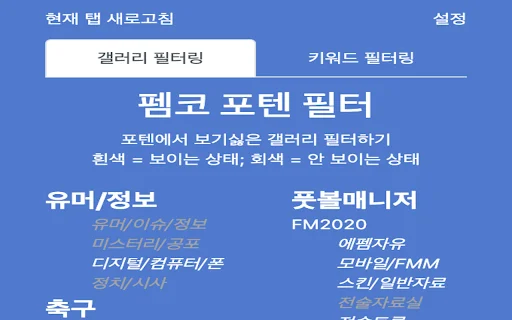
Are you tired of cluttered feeds and irrelevant posts on FMKorea? FMKFilter is the essential browser extension designed to reclaim your browsing experience. By giving you full control over what you see, this tool allows you to hide unwanted galleries, specific keywords, and even annoying comments, ensuring your feed stays relevant to your interests.
Whether you want to filter out political posts, block specific users, or clean up your main page, FMKFilter provides a robust, customizable solution. With a 4.9/5 rating and consistent updates, it is the most reliable way to curate a personalized FMKorea environment. Say goodbye to spam and focus only on the content that matters to you.
Key Features
- Keyword-based filtering for posts and comments.
- Nickname blocking to hide content from specific users.
- Gallery-specific filtering to clean up your main feed.
- Mosaic effect to obscure sensitive or unwanted post titles.
- Import and export settings for easy backup and migration.
- Background tab opening for seamless browsing.
- Manifest V3 compatibility for optimized performance.
- Dynamic filtering updates for a clutter-free experience.
How to Use
- Install FMKFilter from the Chrome Web Store.
- Click the extension icon in your browser toolbar to open the settings menu.
- Add your unwanted keywords, nicknames, or galleries to the respective filter lists.
- Toggle the “Hide Main Page Posts” or “Comment Filter” options based on your preference.
- Refresh your FMKorea page to see the changes take effect immediately.
FAQ
Is FMKFilter free to use?
Yes, FMKFilter is completely free to download and use for all FMKorea users.
Why are some posts not being filtered immediately?
Some filters require a page refresh to apply changes dynamically to the site’s content.
Can I back up my filter list?
Yes, the extension includes a backup and restore feature, allowing you to save your settings to a file.
Are there limits to how many keywords I can block?
Yes, there is a technical limit of approximately 475 keywords to ensure browser performance remains optimal.
Does this work on mobile browsers?
Currently, the extension is optimized for desktop browsers; support for mobile platforms is still in development.
Ready for a cleaner browsing experience? Download FMKFilter now and take full control of your FMKorea feed today!
Users highly value the extension for its effective keyword and nickname filtering, which significantly cleans up the FMKorea interface. While praised for regular updates, users noted occasional stability issues with dynamic pages and limitations on filter capacity.
Kelebihan
- Effective keyword blocking across posts, comments, and nicknames
- Powerful user blocking to filter out unwanted content
- Keeps the site feed clean and relevant
- Reliable developer support with frequent maintenance and updates
Kekurangan
- Filtering sometimes fails to apply dynamically without a page refresh
- Incomplete support for mobile browsers and Firefox
- UI inconsistencies regarding spacing in nickname filters
- Hard limits on the number of blocked users and keywords
Ulasan Pengguna
I checked that I am on version 1.9, but it is not working... Please fix it quickly, it is very stressful.
I have been using it well, but as of today, when this extension is on, all posts on the main page disappear. It looks like there are no posts at all in the trending/popular sections.
I am using it well, but the board filter is not working.
| ID Ekstensi | ebplhplgpajiefbbijkdjhiimfbmimkh |
|---|---|
| Version | 1.9.1 |
| Size | 0.1 MB |
| Developer | ys27 |
| Terakhir Diperbarui | |
| Tanggal Rilis | |
| Jumlah Pengguna | 2.000++ |
| Jumlah Ulasan | 46 |
| Chrome Store Ranking | #20225 |
| Category | Productivity |
| Tipe | Free |

helloNFT Extension: Track Floor Prices & Mint Status Easily
https://hellonft.pro

Download Cateringwaala AI Assistant – Streamline Your Catering Business
AUM AI Pvt Ltd
PDF & QR Tools Nirkai: All-in-One PDF & Barcode Utility
Nirkai

Download UsaTrans Terbaru – Kelola Lelang Mobil AS Gratis
volkovw16

Download IG Likes Export Terbaru – Ekspor Data Instagram Gratis
https://igfollowerexporttool.com

Download Bring Back Youtube Dislikes – Kembalikan Tombol Dislike
Kapri